😱 Make a Random Meme API With Node.js and Puppeteer

👋 Hello there
Today's article is all about how you can make a Random Meme API using Node.js and web scraping. We'll be using Fastify for our API and we'll be using Puppeteer to scrape the web and get the random meme.
This random meme API was inspired by the same kind of API here. But I wanted to build it using Node.js and Puppeteer.
We'll be scraping Memedroid using the Puppeteer NPM package.
Initializing the project
First of all, we'll need to create a folder with the name we want and we'll need to initialize our Node.js app in that folder. We do it using this command:
npm init -y
Then we need two dependencies to install, simply install puppeteer and fastify.
npm i puppeteer fastify
Using Fastify for API
After we have our project set up and our dependencies installed, we're good to go with writing the code! Create an index.js file and import fastify with this code to create the server.
const fastify = require('fastify')({ logger: true });

const start = async () => {
  try {
    await fastify.listen(5555);
  } catch (err) {
    fastify.log.error(err);
    process.exit(1);
  }
};

start();
Once this thing is done, when we run the app using node index, our app will be running on port 5555. But let's create the base route (/ )for it.
fastify.get('/', async (request, reply) => {
  reply.send({ hello: 'world' });
});
Getting the random meme using Puppeteer
Here comes the fun part now! We'll open the web browser and get all the images from memedroid, and we'll do all of it through code.
With the puppeteer package, Chromium also comes installed to scrape the web. That's why it might have taken time for you to get installed
To skip Chromium download, you can use
puppeteer-corepackage and add the path to your Chrome file following the docs.
We'll create a function to get all memes and then we'll pick a random one in the route.
async function getAllMemes() {
  const URL = 'https://www.memedroid.com/memes/tag/programming';

  const browser = await puppeteer.launch({ headless: true }); // launch browser
  const page = await browser.newPage(); // open a page

  await page.goto(URL); // go to the page
}
We simply launch the browser and open the page for memedroid in this code 👆.
Now let's get all the <img> tags which are in the <div> with the class of item-aux-container. That's where all the memes live in.
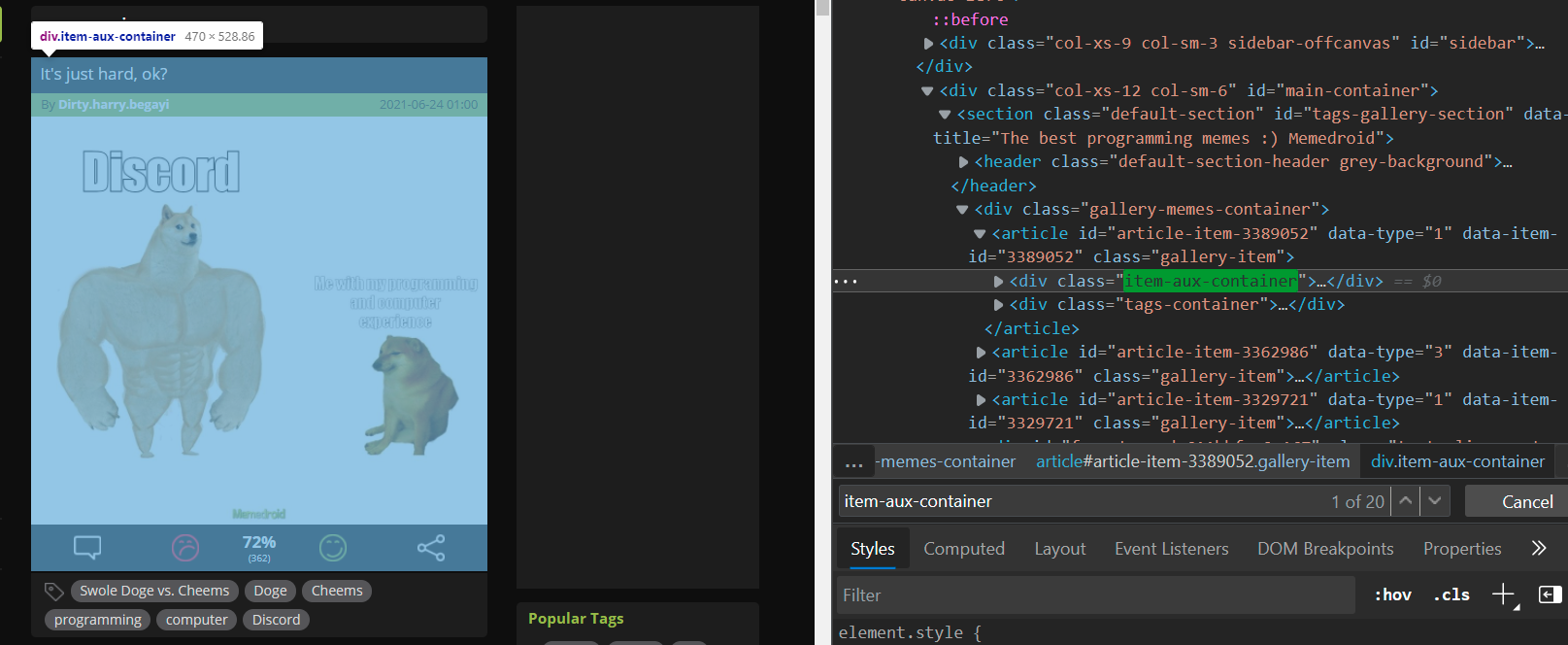
As in the above image, inside of each <article> tag, the div with that class exists, so we simply get it using the $$eval method on the page.
This method takes two arguments:
- Selector
- Callback function with the element(s)
const allImages = await page.$$eval('div.item-aux-container img[src]', (imgs) => {});
We will map over the images in the callback function, and we'll return only the URL of the image from getting the src attribute. And this is how we do it.
We check if the src attribute starts with http and ends with jpeg and we return that if it does.
const allImages = await page.$$eval('div.item-aux-container img[src]', imgs =>
  imgs.map(img => {
    if (
      img.getAttribute('src').startsWith('http') &&
      img.getAttribute('src').endsWith('jpeg')
    )
      return img.getAttribute('src');
  })
);
Unfortunately, that also returns to us null if that's not the case, so we filter out the nulls using the .filter() method.
const imgs = allImages.filter(img => img !== null);
Once all that work is done, we close the browser and return the array of images, this is how the whole function looks like:
async function getAllMemes() {
  const URL = 'https://www.memedroid.com/memes/tag/programming';

  const browser = await puppeteer.launch({ headless: true });
  const page = await browser.newPage();

  await page.goto(URL);

  const allImages = await page.$$eval('div.item-aux-container img[src]', imgs =>
    imgs.map(img => {
      if (
        img.getAttribute('src').startsWith('http') &&
        img.getAttribute('src').endsWith('jpeg')
      )
        return img.getAttribute('src');
    })
  );

  const imgs = allImages.filter(img => img !== null);

  // NEW LINES
  await browser.close();
  return imgs;
}
Using Fastify to send the random meme
Finally, we will pick a random meme and send it to the user using this code
fastify.get('/', async (request, reply) => {
  const memes = await getAllMemes();
  const randomNumber = Math.round(Math.random() * memes.length);
  reply.send({ memeUrl: memes[randomNumber] });
});
Now, whenever the user visits localhost:5555, they get this:
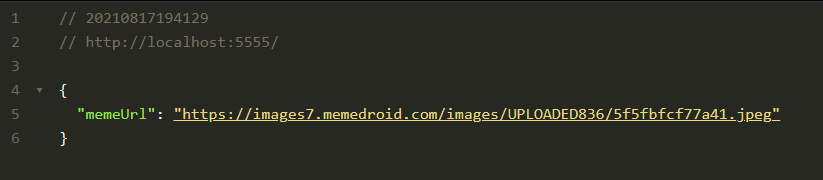

We have our app done! Thanks for reading! You can find all the code here.
I hope you liked it! Comment down your thoughts! There is always room for improvement so let me know your suggestions on this project!
Connect with me on my YouTube channel and my Twitter 😉
Until next time, keeping awesome ✌️
About the author
I am a full stack developer, YouTuber and blogger!
Comments
Join the discussionGreat insight on how to use puppeteer for web scraping!
I have a doubt, how would puppeteer work if this api is hosted on a web server as it uses chromium to get the IDs 🤔
An idea: make an article on how to host this API 😄
Thank you 🙂.
Good question. Many web server hosting services like Heroku provide a service that is able to use Puppeteer.
I'll for sure write an article on that! Thank you for suggesting 😉