# 💄 How to use Microsoft Fluent UI Icons on your website?
## 👋 Hey Developers!
I really love the icons used and provided by Microsoft in their products. And I always wish to use them in my projects. But it is pretty hard to find a way to use them. This post will help you to use them in your project!
It is pretty easy to set this up on both static and React apps.
## 🌐 Setting up on a static site
If you want to use it in your static site, you can include **Fabric UI Core's CDN** in your `` like this 👇.
```html
```
And once you have added that, it's as easy as doing this 👇.
```html
```

You can refer [this site](https://developer.microsoft.com/en-us/fluentui?fabricVer=7#/styles/web/icons#available-icons) and use any icon you want. Just copy the name and paste it in the place of `Mail`.
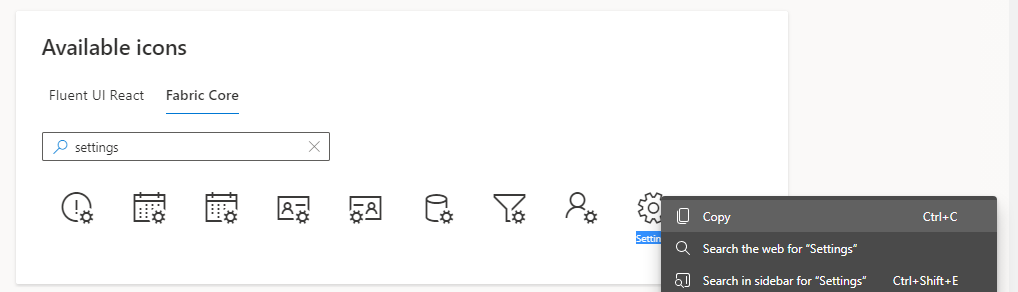
```html
```

## ⚛ Setting up in a React App
There are **2 ways** you can achieve this. 1st one is to include the CDN in the `` tag in `public/index.html` and then use the `` tag as we did in the static type. But I recommend the 2nd way which is better.
Install the `@fluentui/react-icons` package in your app using `npm` or `yarn` as per your preference.
```
npm i @fluentui/react-icons
## OR
yarn add @fluentui/react-icons
```
Once you do that you can easily import the icon components and use them in your app just like this one 👇
```jsx
import { MailIcon, SettingsIcon } from '@fluentui/react-icons';
function App() {
return (
{ /* Without any element */ }
)
};
export default App;
```
As I said you can refer [this site](https://developer.microsoft.com/en-us/fluentui?fabricVer=7#/styles/web/icons#available-icons) and copy the icon name and just append **Icon** after it.
Example: `MailIcon`, `FeedbackIcon`, etc.
### I hope this post helped you achieve your goal. Please give it a like 💙 if you liked it. And share it if you want. [Learn more about Fluent UI](https://developer.microsoft.com/en-us/fluentui)
Good luck 👍 and thanks for reading!