# 😎 How to convert a normal React form to use react-hook-form?
## Hey everyone!
Nice to see you all around again! Today you'll find out how easy it is to use the [`react-hook-form`](https://react-hook-form.com/) library for forms instead of the normal method of forms in React.
So, the first thing is first, normally, in React we use state, and whenever the value of an input changes, we change the state. This method's good but there is a lot of code. Here's how the code looks like in this case.
```js
import { useState } from 'react';
export default function LoginForm() {
const [email, setEmail] = useState('');
const [password, setPassword] = useState('');
const onSubmit = (e) => {
e.preventDefault()
// Submit logic
}
return (
);
}
```
And I personally feel that this is indeed a lot of code that could be made better. That's why you should use `react-hook-form`.
So to convert this normal one to use `react-hook-form`, we install it via NPM or Yarn.
```
npm i react-hook-form
# yarn add react-hook-form
```
And then, the first thing we have to do is get rid of the **state we created**, the `onSubmit` function and the `value` and `onChange` props too.
After we remove that bit of code, we import `useForm` from `react-hook-form`, and this is how we use it.
```js
import { useForm } from 'react-hook-form';
export default function LoginForm() {
const { register, handleSubmit } = useForm();
return (
);
}
```
Then, we use the `register` function as a prop in the inputs to register each input with a name to get the value of it, like this.
```js
return (
);
```
Then, for the form submission, we use the `handleSubmit` provided by the `useForm` hook with our own submit function which provides us the values of the inputs directly. We can also destructure the values from it.
```js
import { useForm } from 'react-hook-form';
export default function LoginForm() {
const { register, handleSubmit } = useForm();
const onSubmit = (data) => { // OR DESTRUCTURING ({ email, password })
console.log(data.email, data.password)
// Submit logic
}
return (
);
}
```
This way, it automatically prevents the page from refreshing on submit.
## 💪 Using it with TypeScript
Using RHF with TypeScript is super easy because firstly, you don't need to install separate type definitions as they come along with RHF.
You've to define an `interface` for the fields you're using, and then pass it in `useForm` as generic.
```ts
interface LoginFields {
email: string;
password: string;
}
// In component
const { register, handleSubmit } = useForm();
```
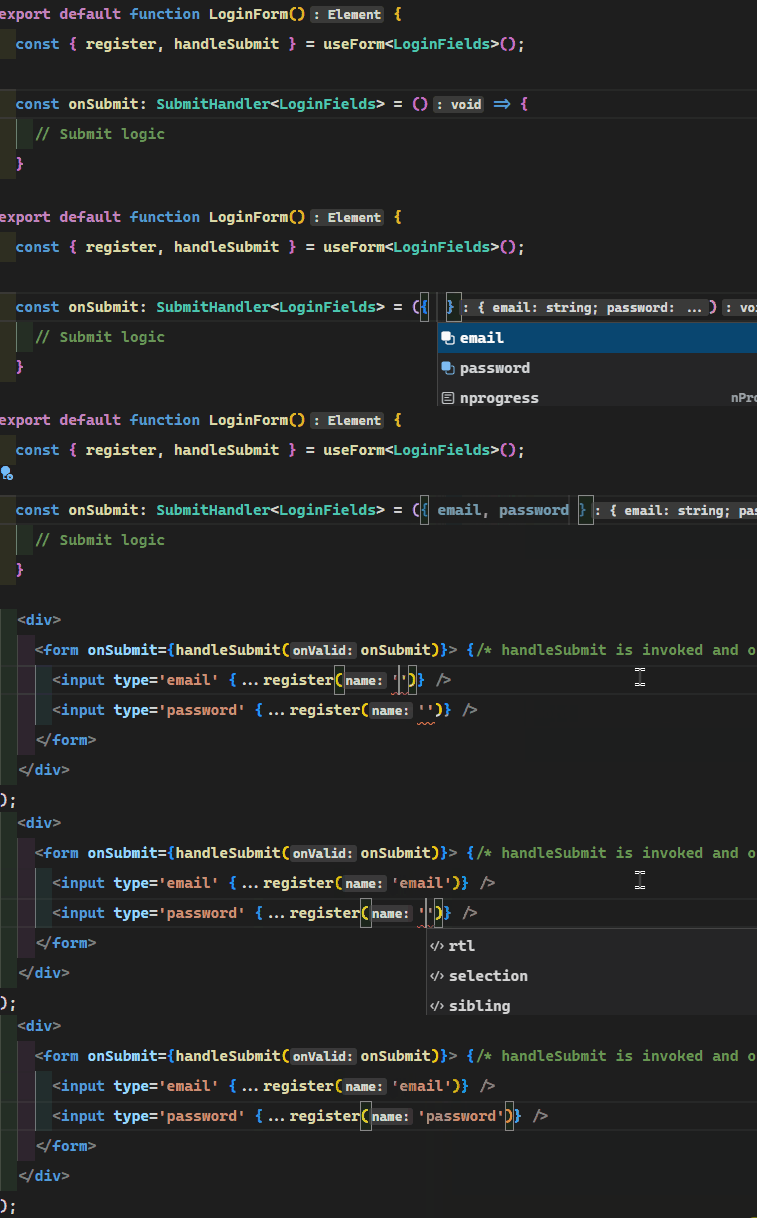
And while calling the submit function, you've to set the type of the `onSubmit` function to the type `SubmitHandler` provided directly by RHF.
```ts
import { useForm, SubmitHandler } from 'react-hook-form';
// In component
const onSubmit: SubmitHandler = ({ email, password }) => {
console.log(email, password)
// Submit logic
}
```
This way you also get good IntelliSense in your IDE or code editor
## Conclusion
You can read a lot more functionalities provided by `react-hook-form` on [their website](https://react-hook-form.com/).
I hope you liked it! Comment down your thoughts! There is always room for improvement so let me know your suggestions on this project!
**Connect with me on my [YouTube channel](https://youtube.com/MaxProgramming) and my [Twitter](https://twitter.com/maxprogramming1) 😉**
Until next time, keeping awesome ✌️