# ♻️ Context API in React! | Switch to it NOW!
## 👋 Hello Developers!!!
### This post covers how you can use the *Context API in React*. Which is an awesome way to manage your state and get rid of *prop drill*.
> **Note:** I have used `.jsx` for component file extensions here, but you can use `.js` if you want, that won't affect your app
### 👉 With the Context API, you have one or more files where you can store your state, functions, and some other logic that you want, and then simply use them in any of your components you want without any more hard work! Let's Go!!!
## 1. 🎨 Folder Structure
If you use `create-react-app` to bootstrap your project, you will have the `src` folder where you have the source code. To optimize the folder structure, I recommend keeping the Context files within a folder called `context` in `src`.
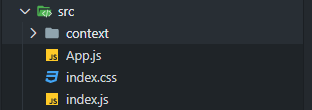
Create a `MainContext.jsx` file inside the `context` folder. And in that file, we will **export 2 components**.
## 2. 🖊 Filling `MainContext.jsx`
Start by importing some stuff from `react`, i.e., `createContext` to create context, and `useState` to create state
```jsx
import { createContext, useState } from 'react';
```
Then, create and export a variable called `MainContext` or whatever you want, and set it to `createContext()`
```jsx
import { createContext, useState } from 'react';
export const MainContext = createContext();
```
This variable/component will be our context.
Create and export another variable/component called `MainProvider`, where we will fill our state and return some *JSX*. As shown below 👇
```jsx
import { createContext, useState } from 'react';
export const MainContext = createContext();
export const MainProvider = ({ children }) => {
const [name, setName] = useState("Usman");
return (
{ children }
)
}
```
Now what do we do here is, we create a component called `MainProvider`, in which we will wrap our whole app. And we render out `` which is the context's provider property.
The `value` prop takes in an **array** or an **object**, which we then destructure to get the state in other components. I recommend using **an object** in the `value` prop, as it is better to destructure an object than an array
> If you are getting confused and don't understand what is going on, try it yourself in your own project after or while reading this blog post, you will understand everything.
## 3. ✨ Using the Context!
Now that we have filled the context file, we have to get use that context in our app, and for that we need to **wrap our app inside the Provider**.
Go to `index.js` file, and import the `MainProvider` component, and wrap your `` inside the `` like shown below 👇
```jsx
import { MainProvider } from "./context/MainContext";
ReactDOM.render(
,
document.getElementById("root")
);
```
## 4. 🚚 Accessing and using our state!
Now it's the time! You can go to any of your components you want, and follow these steps to use and modify state inside your app. I will show the example for `App.js` file.
First off, import `useContext` from `react`, and the `MainContext` from the context file.
```jsx
import { useContext } from 'react';
import { MainContext } from "./context/MainContext";
```
Then we simply use the `useContext` hook like so 👇 to access our state from `MainContext`.
```jsx
import { useContext } from 'react';
import { MainContext } from "./context/MainContext";
function App() {
const { name, setName } = useContext(MainContext);
return (
My name is { name }
)
}
export default App;
```
And that's it! You can also use `setName()` to change the value of `name` and that will also be reflected in the DOM.
You can use any kind of state in your context and pass it in the `value` prop, access it using `useContext()`, and use it 🤷♂️.
I hope you learnt and understood about the **Context API** in React.
I also have a [YouTube video](https://youtu.be/4N_JWP1zGr8) on it if you want to go somewhat in depth
%[https://youtu.be/4N_JWP1zGr8]
Finally, Give the post a 💙 like if you liked it, and don't hesitate to ask questions and give suggestions in the 💬 comments. Thanks for reading 🙏